



Covesive Design System
Building one design system
for cove.tool’s platform and its five tools.
Design system · Accessibility · Documentation

Covesive Design System
A Comprehensive Design System Launched for the cove. Tool Suite of Products
Team
Toolkit
Nov 2023 – Apr 2024
Status: Maturity phase
Purti Hardikar · UX Designer
Khoury Smith · Front-End Dev
Parva Doshi · Back-End Dev
Patrick Chopson · CPO
Adobe XD
Figma
Slab
My Role
Designer —
Audit interfaces, define elements, design components, create pattern libraries, track versions, incorporate feedback, maintain the design system, stay updated.
Timeline & Status
Cove.tool, a platform for sustainable building design, empowers professionals to make data-driven decisions.
To address challenges in consistency and user experience, we developed Covesive, a comprehensive design system designed to improve accessibility, streamline workflows, and ensure a cohesive experience across the platform.
Design & Implement
I worked alongside a small team to audit cove.tool’s existing design, define principles, build scalable components, and document it.
CONTEXT
How we gave cove.tool its first design system
My Role
Document & Maintain
I maintained and documented the design system, documenting it in Slab, our internal docs, so developers always had one source of truth.
In 30 seconds
One shared language for four cove.tool products
The problem
Four tools, four looks
Load modeling, analysis, the drawing tool and revgen had drifted apart: mismatched radii, icons, buttons and type, and developers built from different assets.
What I did
Audit, adopt, extend
I audited the UI and every icon, chose IBM Carbon as the backbone, and built the cove.tool layer on top: brand, icons, app shell, data-viz patterns and guidelines.
Where it landed
A library people used
A shared Figma library with documentation and release notes that designers and developers worked from, plus a Slack channel and contribution rules to keep it alive.
Problem space
Four tools that didn’t feel like one product
Load modeling, analysis, the drawing tool and revgen each grew on their own, and the seams showed:
Fragmented experiences
The same action looked and behaved differently from tool to tool, so architects relearned the basics in each one.
Repeated build work
Developers rebuilt similar buttons, inputs and modals for every tool, adding cost and technical debt.
Consistency that didn’t stick
One design change meant edits across several codebases and files, so inconsistencies crept back in.
Project goal
Give every cove.tool product the same foundations, components and app shell, built on Carbon and documented for designers and developers.
My contribution
What I owned
Audit and foundations
Audited the UI and every icon, then set cove.tool’s colour, type and shape on top of Carbon’s tokens.
A scalable component layer
Designed the modals, app shell and data-viz patterns, with states and variants named to match cove.tool’s React code.
Documentation and upkeep
Wrote the guidelines in Slab and set up release notes and contribution rules so the system stayed current.
Key achievement
By April 2024, Covesive was the shared foundation for new work across all four cove.tool tools, in Figma and in code.
We discovered inconsistencies in all our tools, which impacted both usability and efficiency.
How can I create a design system that is simple, scalable and understandable
by designers and developers?

I did a quick site audit
Much of the pain I felt designing cove.tool’s new features came from the gap between my designs and the live application.
Could it be that the developers were working with different assets?
To validate my suspicions, I did a quick site audit. I discovered that not only were the assets widely different, there were so many variants of buttons, badges, and other components.
DISCOVERY + SITE AUDIT
Low Priority Changes
Medium Priority Changes
High Priority Changes


Documented fixes using screenshots and thorough inspection.
The problem? Too many variants!
We compiled a comprehensive report outlining how we identified and documented various visual inconsistencies across the site. The audit was reviewed by multiple team members to ensure it offers accurate insights and feasible recommendations.
By analyzing the audit and prioritizing design system fixes, we clarified the overall problem space.
You can access the full site audit at the link here >
SITE AUDIT
Icon audit
Every icon, five kinds of inconsistency
Before drawing anything new, I grouped and inspected every icon across the cove.tool tools, logged what was wrong, and ranked each issue by priority with the team.

The drawing tool, with the toolbar icons I flagged during the audit.
High priority
Mixed fills and outlines
Filled and outlined icons sat side by side, so some read as selected when they weren’t.
High priority
Enabled and disabled looked alike
Too little contrast between states: icons looked selected until you hovered over them.
Medium priority
Uneven size and line weight
The save icon’s stroke was heavier and larger than its neighbours in the same toolbar.
Medium priority
Off-palette colours
Some icons used colours outside the set, breaking the rhythm of the toolbar.
Low priority
Blurry exports
Low-resolution assets looked soft on high-density screens.
Starting from what we had
PROCESS
Building a design system from scratch was something that I had never worked on as a UX designer. However, I took it up as a challenge and with the correct mentorship, I was able to deliver a system that we can all rely on for feature updates in our product.
I obviously started by looking for resources and took a few courses before
I started planning this maturity model:


We are here
👇🏻
Phase 2
🤔
Where we want to be🎯
steep..
Maturity..
Process we followed to create the design system, inspired by the approach at mapbox.com.
Toolkit
The tools behind the system
Each tool had one job: capture what existed, design the system, check it, ship it and keep everyone informed.
Audit
html.to.design
Pulled live app.covetool.com screens into Figma, so the audit started from what customers actually saw.
Figma Advanced Notes
Pinned each finding to the screen it came from, tagged high, medium or low priority.
Design
Figma
The Covesive library: tokens, text styles, components, variants and the app shell. Replaced older Adobe XD files.
IBM Carbon kit
The backbone for tokens, the layering model and 40+ base components.
Check
Colour contrast checker
Every text and background pair tested against WCAG 2.1 AA before it became a token.
Ship and share
Chakra UI + React
The code side of the system, with component names matching the Figma library.
Slab
Internal documentation: guidelines, usage and the cove.tool UI standards.
Slack
#cove-design-system for announcements, questions and feedback.
Building Cove's Design DNA
Data-Driven Precision
The design system prioritizes data-driven decisions, clarity, and usability to simplify complex data.
Simplicity and clarity
The design system embodies simplicity, efficiency, and minimalism, supporting sustainability through thoughtful design.
Inclusive Transparency
The design system ensures accessibility, inclusivity, and transparency, fostering trust and usability.
I further defined the qualities that can be expressed by UI regions, surfaces, and components in our design system.
I designed and strategize how our suite of tools is built using foundations that address design from both a broad and detailed perspective.
The key decision
Adopt, then extend
Rebuilding date pickers and modals from zero would have taken months we didn’t have. So we adopted IBM Carbon as the backbone and spent our effort where cove.tool is different.
Cove.tool layer
What I designed
Lato and the cove.tool blue
App shell: header, panels, nav
Icon library
Data viz for building data
Guidelines and docs
↑ builds on
IBM Carbon
What we adopted
Colour tokens and layering model
Type scale
40+ components: modal, date picker, tabs…
Accessibility patterns
In code, Chakra UI elements kept buttons and iconography consistent with the Figma library.
Multi-product
Five tools, one system
cove.tool was a platform with five tools on top. The same library had to serve all of them without flattening their identities, so I split each product into a shared core and a thin brand layer.
Same header component, five products
cove.tool
Projects
Reports
Help
New project
analysis.tool
Projects
Reports
Help
New project
drawing.tool
Projects
Reports
Help
New project
revgen.tool
Projects
Reports
Help
New project
api.tool
Projects
Reports
Help
New project
loadmodeling.tool
Projects
Reports
Help
New project
Only the accent bar and the mark change. The nav, type and the Cyan 60 action are identical in every product.
Shared by all five
Core layer
• Carbon neutrals, layers and borders
• Lato type scale
• Cyan 60 for every interaction
• Support tokens for error, warning, success
• Components, states and the app shell
• Data-viz blue ramp
One token per product
Brand layer
• $product-accent: the product’s colour
• Used for the logo, the product switcher and the active-nav marker
• Allowed in charts as a highlight, never as a status
• Never used for text or buttons
analysis.tool
drawing.tool
revgen.tool
api.tool
loadmodeling.tool
This grew from the draft product-token table in the Covesive file, which paired cove_blue and revgen_red with shared Carbon neutrals.
Foundations
Carbon underneath, cove.tool on top
Carbon’s tokens and layering model gave us a reliable base. On top, I set cove.tool’s colour, type and shape so every tool feels like one product.
Colour
cove.tool blue
#00A0DB
Brand · logo and large moments
Text primary
#161616
$text-primary
Text secondary
#525252
$text-secondary
Layer 01
#F4F4F4
$layer-01 · panels, cards
Border subtle
#C6C6C6
$border-subtle-01
Background
#FFFFFF
$background
Error
#DA1E28
Red 60
Success
#198038
Green 60
Warning
#FDDC69
Yellow 20
Interactive
#0072C3
Cyan 60 · buttons, links, focus
Type · Lato across the product
Energy use intensity
Display · Light 32 / 48
NUSD – South building
Panel heading · Medium 24
Project details
Section header · Bold 14 / 24
Edited last month by Maya Chen
Body · Regular 14 / 24
SAVE CHANGES
Button · Medium 12
# OF PROJECTS
Table header · Regular 11
Corner radius
4px
Inputs, buttons
8px
Cards
24px
Panels
Pill
Tags
Spacing · Carbon scale
4
8
12
16
24
32
48
Tokens
Layers, not light variants
The old library had a “light” copy of almost every component. I replaced those with Carbon’s layering model: the component stays the same, and the surface it sits on decides its colours.
$background · #FFFFFF
$layer-01 · #F4F4F4 · panels
$layer-02 · #FFFFFF · cards
Hover
#E8E8E8
Selected
#E0E0E0
Active
#C6C6C6
$background-brand · cove.tool blue
Before
Duplicated components
Card, Card / Light, Input, Input / Light… every surface needed its own copy, and copies drifted apart.
After
One component, contextual tokens
Hover, selected and active colours come from the layer the component sits on, so one version works everywhere.
Brand
One cove.tool override
We kept Carbon’s neutrals and swapped its brand blue for cove.tool blue, so the product still felt like cove.tool.
Elevation
Depth from borders first, shadows second
Cove.tool screens are dense with data, so heavy shadows add noise. Borders separate most surfaces; shadows are kept for things that float above the page.
Subtle border
$border-subtle-01 · 1px #C6C6C6
Cards, panels, table rows.
Strong border
$border-strong-01 · 1px #8D8D8D
Inputs and controls you can act on.
Menu shadow
Shadows/Menu · 0 2 6 · 30%
Dropdowns, popovers and tooltips.
Raised
shadow/400 · 0 6 19 · 35%
Modals and floating panels.
NUSD – South building
Focus
$focus · 2px #0F62FE
Visible keyboard focus on every interactive element.
NUSD – South building
Error
$support-error · 2px #DA1E28
Invalid inputs, paired with an error message.
NUSD – South building
Interactive
$border-interactive · 3px
Selected tiles and active choices.
Values taken directly from the effect styles in the Covesive Figma file.
Accessibility
Checking the palette against WCAG
Every text and background pair was checked against WCAG 2.1 AA: 4.5:1 for body text, 3:1 for large text and UI controls. One result changed the system.
Pair
Ratio
Body text
Large / UI
Aa
Text primary on white
18.1:1
Pass
Pass
Aa
Text secondary on white
7.8:1
Pass
Pass
Aa
Text primary on $layer-01
16.5:1
Pass
Pass
Aa
cove.tool blue on white
2.98:1
Fail
Fail
Aa
White on cove.tool blue
2.98:1
Fail
Fail
Aa
Cyan 60 on white
5.0:1
Pass
Pass
Aa
White on Red 60
5.0:1
Pass
Pass
Aa
Text primary on Yellow 20
13.5:1
Pass
Pass
Finding
The brand blue can’t carry text
cove.tool blue reaches only 2.98:1 against white, so blue links and white-on-blue buttons fail even the 3:1 minimum for controls.
Fix
Split brand from interaction
Buttons and links use Cyan 60 (#0072C3, 5.0:1), already in the palette. cove.tool blue stays for logos, illustrations and large brand moments.
Accessibility, product by product
Five brand colours, tested one by one
Each cove.tool product had its own brand colour. Before any of them became a token, I tested how it could be used: as a fill behind white text, as text on white, and behind dark text.
Product colour
White text on colour
Colour as text on white
Dark text on colour
analysis.tool
Cove blue · #00A0DB
2.98:1
Text
UI
2.98:1
Text
UI
6.08:1
Text
UI
drawing.tool
Orange · #E47820
3.00:1
Text
UI
3.00:1
Text
UI
6.04:1
Text
UI
revgen.tool
Revgen red · #C92913
5.51:1
Text
UI
5.51:1
Text
UI
3.28:1
Text
UI
api.tool
Amber · #E29E23
2.30:1
Text
UI
2.30:1
Text
UI
7.88:1
Text
UI
loadmodeling.tool
Green · #159947
3.70:1
Text
UI
3.70:1
Text
UI
4.89:1
Text
UI
Text = WCAG 2.1 AA for body text (4.5:1). UI = AA for large text, icons and control boundaries (3:1).
What we did about it
Rule 1
One shared interactive colour
Buttons, links and selection use Cyan 60 in every product. Brand colours never carry interaction, so every tool passes the same way.
Rule 2
Brand colours are accents only
Logos, the product switcher, the active-nav marker and chart highlights. Where text must sit on a brand colour, it’s dark text (6:1 and above), never white.
Rule 3
Brand red isn’t error red
Revgen red (#C92913) passes contrast, but reads like an error next to Carbon’s #DA1E28. It stays a brand mark; status always uses the shared support tokens.
Confusing
revgen.tool
Analysis failed
Brand and error look the same, so a healthy revgen screen reads as broken.
Clear
revgen.tool
⚠ Analysis failed
The brand is a small mark on a neutral chip; errors use the support token, an icon and words.
Iconography
One icon language across four tools
The audit fed straight into a small set of rules, so new icons stopped adding to the problem.
Outline by default
Filled versions only mark an active or selected state.
One colour
Icons inherit the text token, so state changes stay consistent.
Fixed sizes
16, 20 and 24 px, each on its own grid with even stroke weight.
Sharp exports
SVG only, so nothing looks blurry on high-density screens.
Old name
New name
server_icon-34
icon/data/server/24
subtract-circle_icon-48
icon/action/remove/20
energy_results_viewer-icon_24x24
icon/results/energy/24
attatch_icon-10
icon/action/attach/16
Names follow category / name / size, matching how developers import icons in code.
Components
Components in cove.tool’s voice
Carbon components, restyled and named to match cove.tool’s React code, plus the app shell every tool shares.
App shell · header
cove.tool
Projects
Users
Admin
About
Contact Us
Help
P
Buttons
Run analysis
Compare
View report
Delete project
Disabled
Project name
NUSD – South building
Shown on reports and exports
Building type
Apartments
⌄
Tags and status
Energy
Daylight
Embodied carbon
Draft
In review
Complete
Energy model updated
Results refreshed for NUSD – South building · 2 minutes ago
States and variants
Every state, plus components only cove.tool needs
Each component ships with its full set of states. On top of Carbon, I added variants built for architects working with building data.
Project card · states
South Building
Edited last month
Default
South Building
Edited last month
Hover
✓
South Building
Selected to compare
Selected
Loading
South Building
Analysis failed · Retry
Error
Text input · states
Height
Floor-to-floor height
Default
Height
13’-6”
Focus
Height
-2’
Height must be positive
Error
Height
Locked by template
Disabled
Height
55,000 SF
From the model
Read-only
Tooltips · three types
EUI · Energy use intensity
Annual energy per square foot, in kBtu/sf/yr.
Site EUI
Definition
Explains a term on hover. Used for building-science jargon.
ⓘ
Powered by cove.tool analysis
ⓘ next to a result
Info
Short context behind an icon. The “powered by cove.tool” badge uses it.
Climate zone 4A is set from the project address.
Learn more
Change
Click to open
Toggletip
Opens on click and can hold links or actions.
Built for architecture · cove.tool-only variants
SITE EUI
38
kBtu/sf/yr
7 below target of 45
Better than target
SITE EUI
44
kBtu/sf/yr
1 below target of 45
Near target
SITE EUI
58
kBtu/sf/yr
13 above target of 45
Above target
Report-type tags
Energy
Daylight
Embodied carbon
Climate
Cost
One colour per analysis type, reused in charts and cards.
Units toggle
IP · ft, kBtu
SI · m, kWh
Switches every value on screen between imperial and metric.
Floor list row
Floor 1
0’-0”
100%
Floor 2
13’-6”
100%
From the drawing tool’s right panel: name, elevation, opacity.
Component deep dive
Anatomy of a cove.tool modal
Modals carry most of cove.tool’s set-up work, from creating projects to running analyses. I rebuilt them first, on Carbon’s three modal types.
1
STEP 1 OF 2
New project
2
✕
3
Tell us about the building
Project name
NUSD – South building
Building type
Apartments
4
Cancel
Create project
1
Header
A short label for multi-step flows, then a title that says what you’re doing.
2
Close
Always top right, and Escape does the same, so nobody gets trapped.
3
Body
One task per modal. Fields use Carbon’s filled inputs on a white layer.
4
Footer
Full-width buttons, primary on the right, so the next step is always in the same place.
Passive
Information only, no footer actions.
Transactional
Create, edit or run something. The common case.
Danger
Deleting projects or data. Red primary button and explicit wording.
App shell
One frame for every tool
Load modeling, analysis, the drawing tool and revgen all sit in the same shell. Learning one tool means you already know where things are in the next.
cove.tool
Header · product nav, project, role, help, account
Left panel
Navigation, folders, statistics
Canvas
The work itself: the drawing, the model, the report
Right panel
Properties for whatever is selected: floors, zones, inputs
Dashboard
Folders and team statistics in the left panel; projects on the canvas.
Drawing tool
Tools in the rail; floors and zones in the right panel.
Results viewers
The same nav bar of result types across energy, air systems and rooms.
Data patterns · embodied carbon
Patterns for carbon data
The embodied carbon tool pushed the data patterns furthest: project totals, baselines, material mixes and life-cycle stages. Each pattern became reusable across tools.
1 · Headline metrics
TOTAL EMBODIED CARBON
23,000
tCO2e
A1–A3 · 60-year lifespan
REDUCTION VS BASELINE
20%
Achievable with selected EPDs
DESIGN STAGE
Concept
New construction · medium electrification
2 · Baseline vs achievable, by system
Baseline
Achievable
Super-structure
7,500 / 9,000
Sub-structure
1,500 / 2,000
Enclosure
4,800 / 6,000
Interiors
2,600 / 3,000
tCO2e. The gap between the bars is the saving the architect can still unlock.
3 · Material mix per system (top materials)
Super-structure
Steel 30%
Concrete 20%
Timber 18%
Rebar 15%
Sub-structure
Concrete 15%
Steel 15%
Rebar 5%
4 · Life-cycle stages (EN 15978)
A1–A3
Product
A4
Transport
A5
Install
B1–B7
Use
C
End of life
D
Beyond
Stages in scope are filled; the rest stay visible so it’s clear what the number leaves out.
5 · EPD detail card
Ready-mix concrete · 4000 psi
Super-structure › Slabs · Industry average
Source · EC3
GWP
284 kgCO2e/yd³
DENSITY
2,400 kg/m³
UNCERTAINTY
11%
VALID UNTIL
10-06-2026
Patterns and sample values from the embodied carbon tool’s design file.
Adoption
A system people could actually use
A library only helps if people trust it. I set up the docs, rules and rituals that kept Covesive current.
Read me
Getting started
How to switch the library on, find components and report bugs, in one page.
Best practices
Rules for contributing
Auto layout everywhere, clear layer names, and component names that match cove.tool’s React code.
Release notes
Versioned changes
New colour tokens, the layering model and fewer variants, logged so nobody was surprised.
Community
#cove-design-system
A Slack channel for announcements, questions and feedback from designers and developers.
Accessibility
Built-in guidelines
Contrast targets, visible keyboard focus, screen-reader roles and text that scales to 200%.
Writing
Writing and microcopy
Plain, action-led language so labels, errors and empty states sound like one product.
Keeping it current
How Covesive kept evolving
A design system goes stale the moment people stop trusting it. Every change, big or small, ran through the same loop, and every release was logged.
01
Collect
Feedback from Slack, design QA and new feature work
→
02
Triage
Rank high, medium or low, the same way as the audits
→
03
Update
Change the library on a Figma branch, with states and docs
→
04
Review
Check with developers so the Chakra side matches
→
05
Release
Publish, log it in the release notes, announce in Slack
↺ Then back to Collect. The loop never closed.
From the release notes
Release 1
Tokens and layers
• New colour tokens
• Layer set and contextual layer tokens
• Components rebuilt with newer Figma features to cut file size
Release 2
Docs and fixes
• More documentation
• New tree view component
• Fixed background variables and the white ghost button
Release 3
Cleaner names
• Token names renamed to match their use
• Layer and text styles moved to the new tokens
• Light variants removed in favour of layers
So how will a design system help?
Looking back at the original problem at hand –I knew I had to create a design system that would be easy for both designers and developers to use and understand.
After all, the needs of the developers were just as crucial as the designers'.
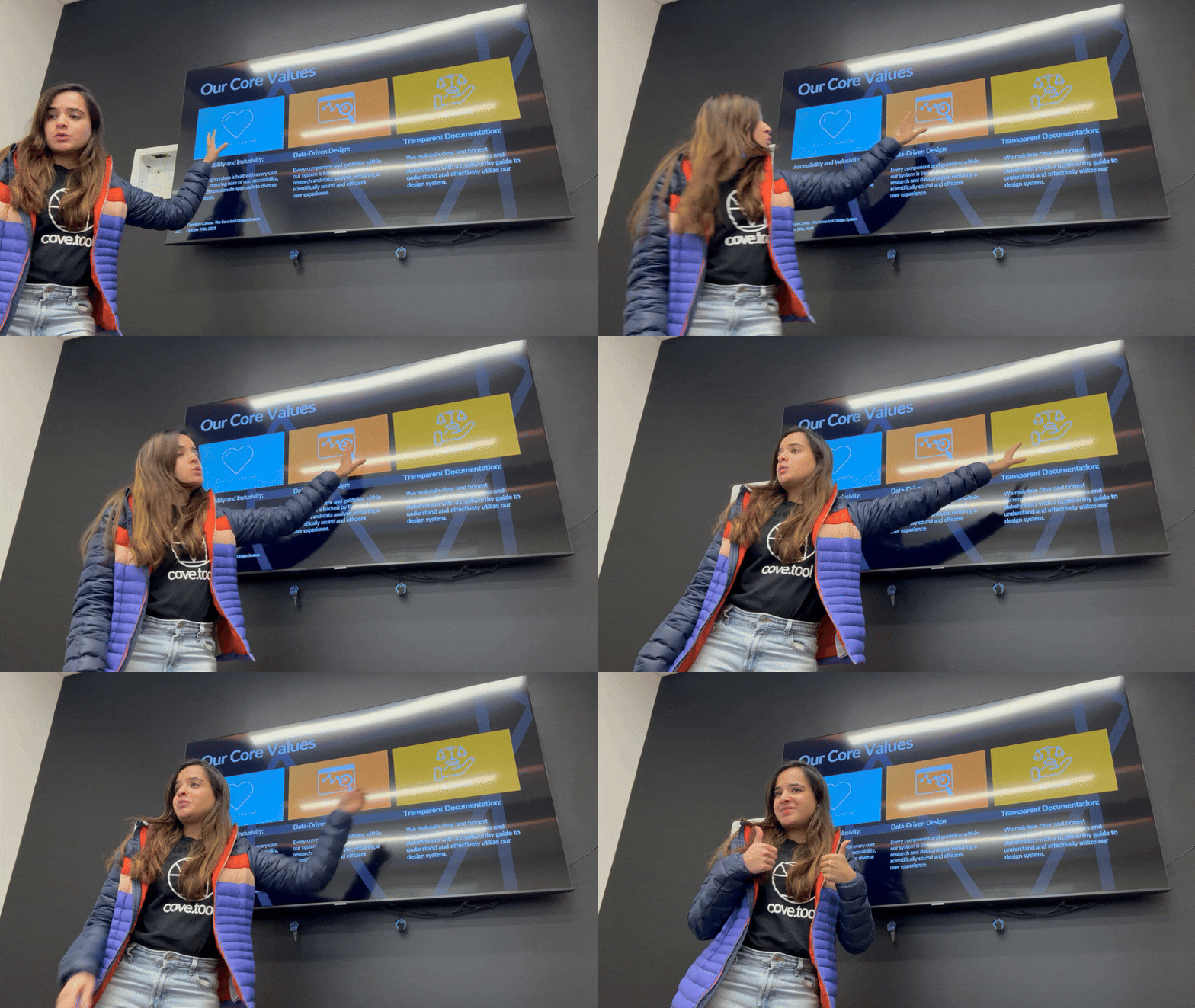
I pitched our design system to our stakeholders and the software team to showcase how a design system will benefit the team & the company.
Impact
What changed for each team
The pitch promised every team something different. Here’s what each one got from Covesive by April 2024.
Design
Mock-ups from parts, not pixels
Designers built new screens from approved components instead of redrawing buttons, inputs and modals each time.
Engineering
Names that match the code
Tokens and components share names with the Chakra UI implementation, so “which blue is this?” stopped being a question.
Product
Specs that read the same
Feature specs across load modeling, analysis, the drawing tool and revgen used one vocabulary and one set of states.
Marketing and sales
Demos that look like one product
Lato and the cove.tool palette were shared with marketing, so product demos and decks matched the app.
Architects using cove.tool
Learn once, use everywhere
The same shell, controls and states across tools means skills carry over from one tool to the next.
The system itself
Easier to change safely
With layered tokens, one change updates every surface instead of a dozen duplicated light variants.
Before → after
The same dashboard, before and after Covesive
Same content, same layout. The difference is that every piece now comes from the library: one header, one panel surface, one card, one set of buttons and inputs.
Before · original cove.tool

The original cove.tool dashboard, with names blurred.
After · rebuilt with Covesive
cove.tool
Projects
About
Contact Us
Help
P
Project page
→
Learning resources
→
STATISTICS
22
Total projects
4
Tools in use
TOP USERS
M
Maya Chen
7
S
Sam Patel
2
L
Leo Martins
2
Project list
New project
▱
PNNL Mid-rise
Edited last month
Energy
▱
Campus Station
Edited last month
Daylight
▱
Airport Terminal
Edited last month
Energy
▱
PNNL Warehouse
Edited last month
Carbon
▱
Design Studio
Edited last month
Daylight
▱
Single Family
Edited last month
Energy
▱
Education Block
Edited last month
Carbon
▱
South Building
Edited last month
Energy
One surface model
The left panel sits on $layer-01; cards sit on white with the subtle border token.
One card
Every project uses the same card: 8 px radius, thumbnail, name, date and a tool tag.
Accessible actions
Buttons and links use Cyan 60, so they pass contrast, while cove.tool blue stays the brand colour.
The “after” screen is recreated for this case study with Covesive components and placeholder names.
Where it landed
Phase one shipped, in Figma and in code
By April 2024, Covesive was the shared source for new work across cove.tool’s tools.
Shipped in code
Developers implemented the tokens and core components with Chakra UI, using the same names as the Figma library.
One library, four tools
Load modeling, analysis, the drawing tool and revgen drew from the same foundations, components and app shell.
One source of truth
Guidelines and usage lived in Slab, our internal docs, so handoff questions had a single answer.
A system that kept moving
Release notes, contribution rules and a Slack channel kept it current after launch.
Phase two, in the maturity model
Motion guidelines
Empty states
Wider data-viz library
Public roadmap
Adoption tracking
Phase two
Empty states and a public roadmap
Phase one made screens consistent when they were full. Phase two starts where cove.tool screens are empty, and opens the roadmap so teams can plan around the system.
Empty states · one pattern, three moments
▢
No projects yet
Start by creating a project or importing a model from Revit or SketchUp.
New project
Import model
◔
No results yet
Run an energy analysis to see EUI, loads and comparisons against your target.
Run analysis
What does it check?
⌕
No EPDs in this library
Add industry averages or product-specific EPDs to calculate embodied carbon.
Add EPD
Browse EC3
Every empty state answers three things: what this space is for, why it’s empty, and the one action that fills it.
Proposed public roadmap
Now
Empty states
Projects, results and libraries
Motion guidelines
Durations and easing for panels and modals
Adoption tracking
Which screens use library components
Next
Product accent tokens
$product-accent shipped for all five tools
Carbon data patterns
Baselines, mixes and life-cycle charts as components
Contribution form
A template for proposing new components
Later
Dark mode
Using the layer tokens already in place
Public docs site
Covesive guidelines outside Slab
Figma variables
Tokens as variables for theming
A proposed roadmap: where Covesive was heading after April 2024.
Takeaways
What I’d carry into the next system
“
This was my first time scaling and maintaining a design system. It taught me as much about pitching, scoping and working across teams as it did about components.
Consistency
Pitching
Scoping
Cross-team collaboration
01
Consistency builds trust
When the same action looked the same in every tool, users stopped second-guessing the interface and developers stopped asking which version was right.
02
Scale by reuse, not rebuild
Reusable components with clear states let new features ship from parts that already existed, instead of a fresh build for each tool.
03
Pitch and scope before you build
Getting buy-in meant showing the cost of drift, then scoping phase one tightly so the system shipped instead of growing forever.
04
Keep adapting with the people using it
Regular feedback from designers, developers and stakeholders exposed blind spots and kept the system in step with the product and brand.