



OVERVIEW
Acelab’s homepage showed every user the same page. I owned the redesign end to end, as both PM and designer.
Problem
Acelab’s homepage showed every user the same page. New and invited users had no clear first step, so activation stalled just as the company needed product-led growth.
Solution
As PM and designer, I turned it into one adaptive homepage: a Launchpad, page states for self-serve and invited users, and one way to start a project everywhere.
Outcome
Handed off with a PRD of 10 user stories and success metrics for activation, collaboration and conversion. Now in development.
PRODUCT
Homepage and onboarding: the front door of Acelab’s Materials Hub
TIMELINE
Discovery Sep ‘26 → flows and widget system Oct ‘26 → final design, PRD and dev hand-off Oct 26 ‘26
Status: In development
MY ROLE
I owned this as both product manager and designer. The job was as much about deciding what to build, and in what order, as about pixels. I framed the problem, wrote the PRD, set the success metrics and designed every state engineering built against.
Discovery & research
Pulled PostHog funnels, CX tickets, stakeholder meetings and competitor benchmarks into one affinity map.
Problem framing
Turned 33 observations into one goal both user types share: reach a real project faster.
Strategy & scope
Scored 30 widgets for value and effort, cut them to an MVP and wrote down what was deferred and why.
System design
Defined show and retire rules for every widget and the three page states the homepage moves through.
Interaction & motion
Designed the Launchpad, its celebration, inline replies and every empty, error and viewer state.
PRD & hand-off
Wrote the PRD with 10 user stories and acceptance criteria, and ran hand-off with two engineering teams.
TEAM
Purti Hardikar - Product Manager & Lead Product Designer
Annika Harmsen - Team member
Archi-techs (ARC) - Engineering
BIM Reapers (BIM) - Engineering
SCOPE & SURFACE
10 user stories across two onboarding journeys. Homepage, Launchpad, project creation modal, project updates widget and Explore shortcuts.
IMPACT
Success metrics set at 30, 60 and 90 days, with baselines from the AECO team. Results will follow launch.
WHY NOW
After the Series A, Acelab bet on product-led growth: users sign up, find value and bring their team without a sales call. So I mapped where they dropped off.
PostHog backed it up: in the 30 days before launch, under 5% of visitors did anything inside a project, and almost no one invited a teammate.
SO THE REDESIGN HAD THREE GOALS
01
Reduce drop-off
Keep new and invited users from leaving before their first session ends.
02
Get everyone to a project
Creating, copying or opening a project is the first meaningful action.
03
Make the first action meaningful
Save a product, add it to a project, reply to a teammate: real work, not a tour.
THE PROBLEM
Every card had equal weight, new users had no first step, and invited users were asked to create a project their team already had.

1
“Welcome back” greets brand-new users too.
2
Key tools hide in a nested sidebar under General Research.
3
“Pick up where you left off” shows one project, with no comments or team updates.
4
Project creation is a small card, named differently from the modal.
5
Marketing gets the same weight as work, so it “feels like ads”.
6
Search sits in the top bar, and almost nobody used it (PostHog).
Before: the old homepage and nested sidebar. Every user saw this layout, from day one to year two.
CX TICKET · HGA
“The homepage feels like ads and has no clear first action.”
CX TICKETS · NEW USERS
New users asked to skip the homepage and go straight to project creation.
DISCOVERY
Six sources before any pixels: PostHog funnels, CX tickets, stakeholder meetings, the Help Center, a flow audit and competitors.
Search is the first thing self-serve users do, across most early steps
POSTHOG
the typical wait before a new user opens a project
POSTHOG
median length of a first session
POSTHOG
THE CORE TENSION
WHERE NEW USERS LAND
The homepage
Same cards for everyone, no first step
2–3 days
before a first project
WHERE THE VALUE LIVES
Inside a project
Schedules, Smart Docs, comments, RFIs
JOURNEYS
Self-serve users arrive with nothing set up. Invited users arrive by email into a firm that already has work. Each path breaks in different places.
SELF-SERVE FLOW
Start free
→
Sign up
▼ never verifies
→
Profile
▼ Google users skip it
→
One question: your role
→
Homepage
→
Search + save
▼ 2–3 day gap
→
Bring data in
→
Project data in Materials Hub
INVITED FLOW
Invite email
▼ never accepts
→
Create account
▼ detour back to email
→
Company or project?
→
Project opens on Schedules
→
Role check
▼ viewers unsure what they can do
→
First meaningful action
SELF-SERVE
They need to be taught. The page should give one clear next step and turn their first search into a project.
INVITED
They convert better and already have work waiting. Skip the teaching and land them in their team’s projects.
PRINCIPLES
They came straight from the friction map. Each one shows up as a real detail on the homepage.
Saved products
TerraVista ClayGuard
Solterra Building Materials
Add to project
RULE 1
Start from what users already care about. A saved product becomes a project in one click, with no walkthrough first.
Your Launchpad
50%
Next:
Create a project →
RULE 2
Every user lands on exactly one suggested action. The Launchpad shows it, and it can be closed whenever they want.
Sync from Revit
›
Import from file
›
Start from a template
›
Create a blank project
›
RULE 3
Start from the data users already have. The same four ways to create a project, in the same order, everywhere.
SELF-SERVE
How to create a project
INVITED
Open a team project
RULE 4
A new firm and an invited teammate need different first screens. The page changes with project access and what they’ve saved.
FROM THE PM SIDE
“

Purti Hardikar
PM and Lead Product Designer, Acelab
PRIORITIZING
Thirty candidate widgets from seven products, scored for value and effort.
QUICK WINS · BUILD FIRST
Product search
Projects
Where you left off
Get started checklist
Saved products
Quick actions
BIG BETS · PLAN CAREFULLY
Tasks · activity log
Discover matches
Ask Ace side panel
Upcoming deadlines
Project health (admin)
FILL-INS · IF TIME ALLOWS
Webinars
Product spotlight
Trending news
Browse by material
Templates
RECONSIDER
Saved search alerts
CEU credits tracker
Team adoption (admin)
Revit sync status
Value × effort: starting estimates I took to the team. Value ≥ 4 is high; effort ≥ 3 is high.
SCOPING (PM HAT)
I cut the full vision down to what would prove the idea fastest.
EXPLORED
Day 0, first save, first project, team invited and returning, each with its own widget set, plus admin dashboards and a customizable home.
SHIPPED FIRST
No projects, has saved products, has project access. One setup checklist and one tabbed card for recent work, comments and activity.
Why layouts and Essentials waited for v2
Movable widgets meant saving every user’s and every firm’s layout, a new piece of engineering on its own. So v1 ships the essential widgets in fixed places, and new ones are added over time.
TRADE-OFFS
As PM I had to pick a side, or find a design that didn’t need one. Each call cost something.
01
Marketing space vs. a page that feels like work
GROWTH
As a startup, the homepage is where users learn what’s new. Webinars, Trending and Spotlight needed a home.
CX
Tickets said the old page “feels like ads” and has no clear first action.
WHAT I DECIDED
Keep all three, but only in the right column. Work owns the main column, and Trending hides when there’s nothing new.
WHAT WE GAVE UP
Less room for promotion than marketing wanted.
02
Promote the paid feature vs. keep free firms moving
REVENUE
Revit sync is the fastest path to real data, and it’s an AECO Pro feature.
FREE FIRMS
Most self-serve users are on the free plan and can’t use it.
WHAT I DECIDED
Revit stays first for everyone, labelled by plan: “Fastest if you work in Revit” for Pro, “Included in AECO Pro” for free. The other three options are never gated.
WHAT WE GAVE UP
A free user sees an option they can’t use yet.
03
Teach new users vs. get invited users to work
SELF-SERVE
New users need guidance, and the friction map showed most drop-off in Activate.
INVITED
Invited collaborators convert better, so the meeting notes said to prioritize them.
WHAT I DECIDED
One page with two starting points. Self-serve users get the Launchpad and creation options; invited users land on their team’s projects.
WHAT WE GAVE UP
Two sets of states to design, build and test instead of one.
ITERATIONS
The whole homepage


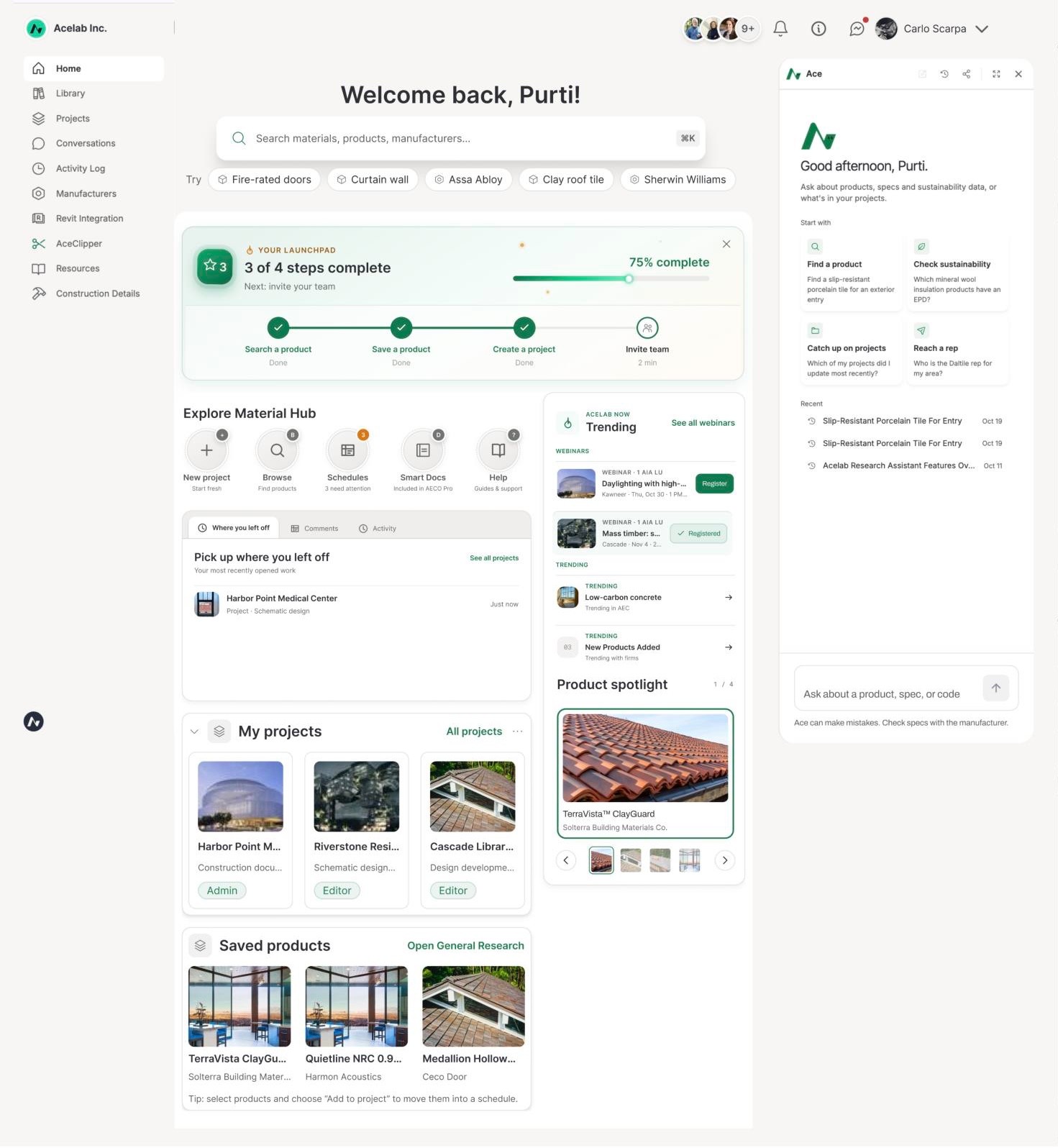
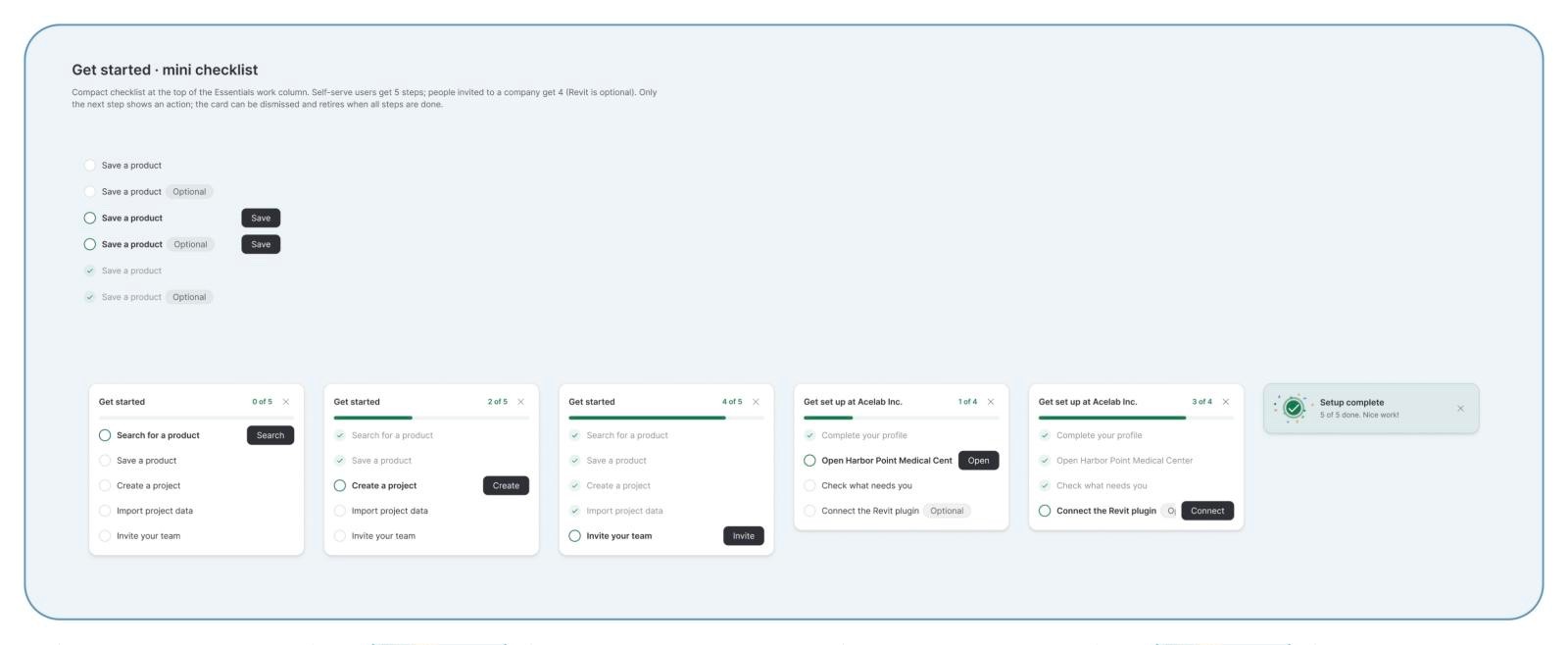
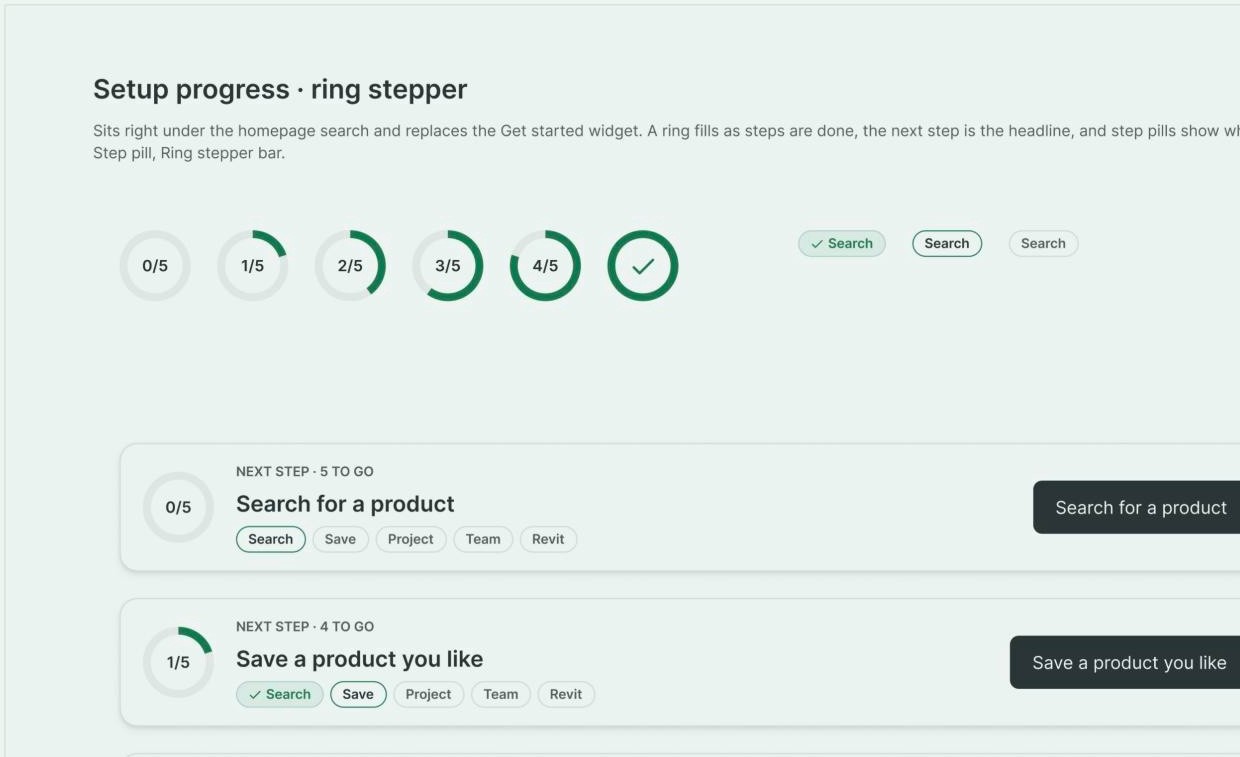

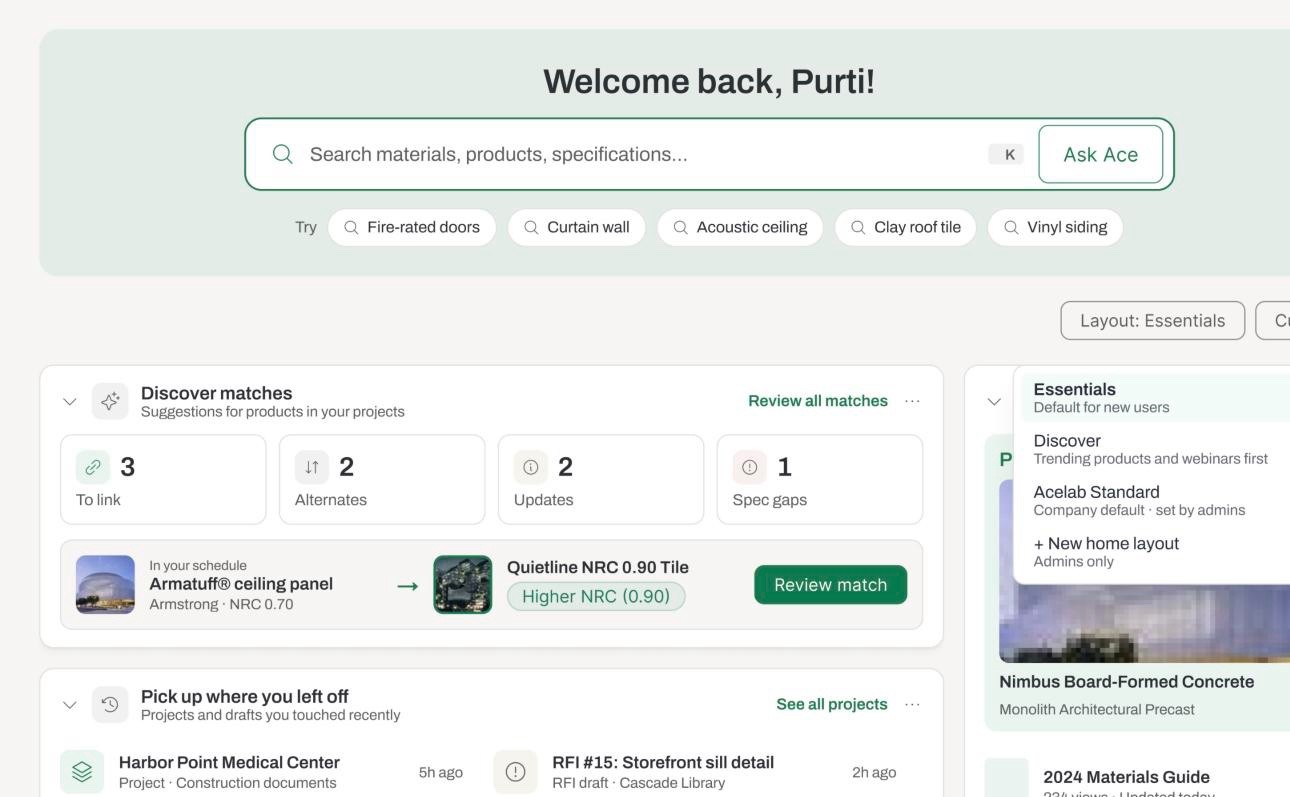
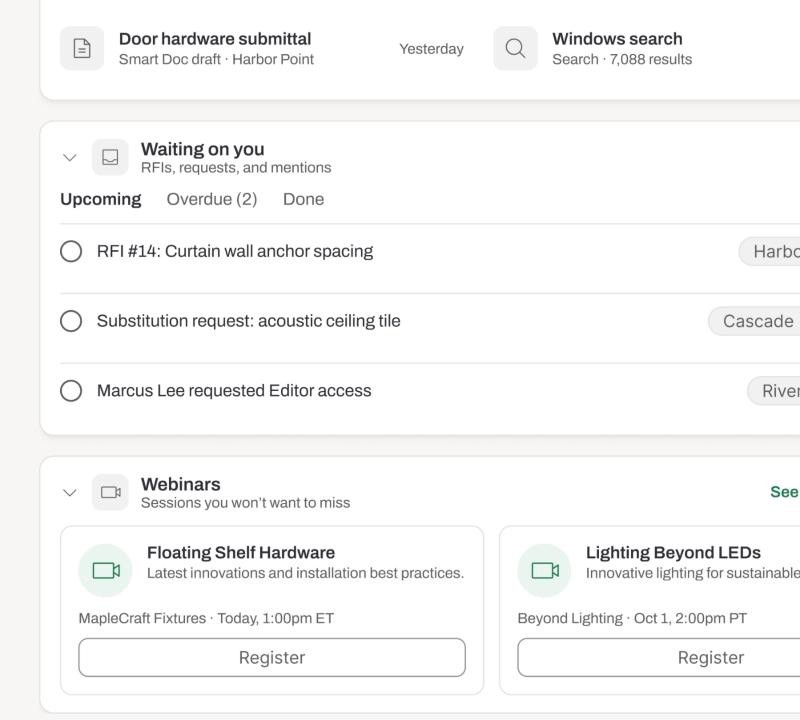
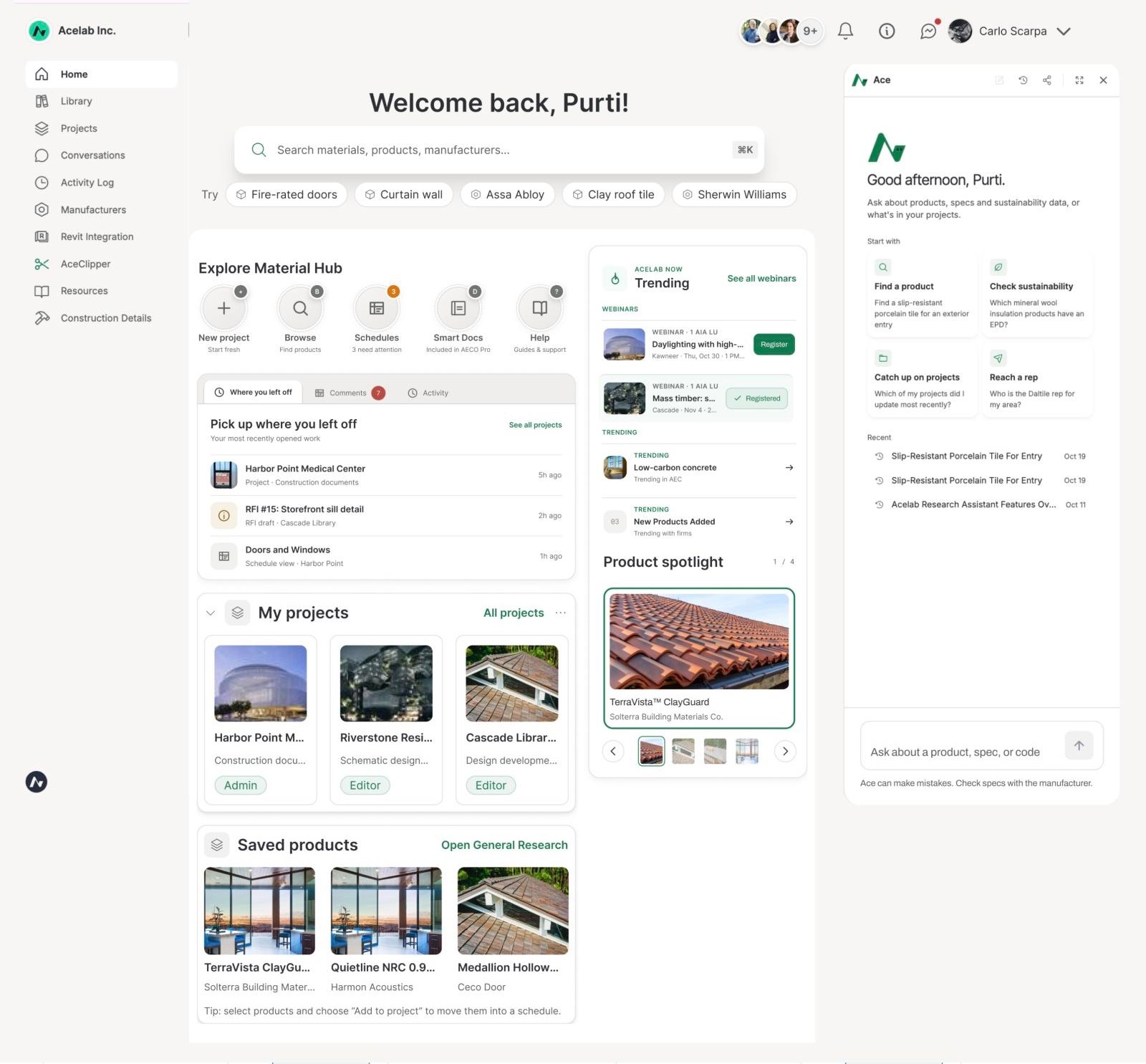
ADAPTIVE HOMEPAGE
The page reacts to what each user has done. Setup widgets retire once they’ve done their job.


SYSTEM
Every widget has two triggers: when it shows and when it retires. Engineering built one page that assembles itself.
WIDGET
SHOWS WHEN
RETIRES WHEN
Launchpad
First login
All steps done, or closed with X
How to create a project
No project access yet
First project created
Saved products
First product saved
Never
Project updates widget
Has project access
Never
Browse by material
Day 0
Setup done, or 5+ searches
Search · Ask Ace
Always on
Always
Never
Spotlight · Trending
Always on
Always
Never
CRAFT
Setup progress shows as 4 steps for free firms and 5 for AECO Pro, with % complete instead of XP. Finishing it plays a ~1.6s celebration once, then it’s gone for good.
Features that used to hide in the sidebar now sit one click from home. On hover the circle lifts, a dashed ring turns and a dot orbits; badges that need attention pulse on their own. With reduce motion on, only the shade changes.
Explore without a search query
The product browser used to hide behind a link that people had to open, and almost nobody did. Now it sits on the homepage, so anyone can explore Materials Hub by material, type and project without knowing what to type.
Having a project is the first meaningful action in Materials Hub: schedules, Smart Docs, comments and activity all live inside one. So creating, importing, copying a template or opening a team project is reachable from six places on the homepage, and every one uses the same four options.
ON THE HOMEPAGE
WHAT IT OPENS
Sync from Revit
Fastest if you work in Revit

Opens in a new tab: plugin setup for AECO Pro firms, the Revit integration page for free firms.
Import from file
Upload a CSV and map the columns

→

Project details, then straight into Import Products (Upload, Assign fields, Complete) in the same flow.
Start from a template
Copy a project and its products

Skips the chooser and opens Start From Template directly.
Create a blank project
Name it and add products as you go

Opens the project creation modal. Skip & Create keeps it to one step.
One fixed-height card with three tabs: Where you left off, Comments with inline reply, and Activity. I designed every state: unread, hover, replying, sent, failed, viewer, free firm, empty and error.

Comments list and hover, reply sent, Activity for a free firm, team fallback, and a first-time empty state.
A short tour, only if they want one
Four steps, under a minute, skippable from the first screen and reopenable from Help. It points at the same four things the Launchpad does, so nothing is taught twice.
SHIPPING (PM HAT)
A PRD with ten user stories, and a hand-off file with flows, states and motion side by side.
FIGJAM
Flows, affinity map, value × effort
PRD
Problem, decisions, out of scope, metrics
FIGMA HAND-OFF
User flows, states, motion keyframes
SLACK
#feature-homepage-onboarding
MEASURING IT
Success criteria set before launch, in three windows.
STARTING POINT · 30 DAYS BEFORE LAUNCH
of visitors did anything inside a project
ACTIVATE
shared a project or invited a teammate
COLLABORATE
visits came from desktop, so the homepage is desktop-first
DEVICE
PostHog, last 30 days before the new homepage. Figures are rounded to protect Acelab’s data. These are the baselines the goals below are measured against.
Each metric maps to a PLG outcome:
Activation
Engagement
Collaboration
Retention
Conversion
Are people using it?
Clicks on each project creation option
Activation
Revit clicks vs. projects actually synced
Conversion
Comment replies sent from the homepage
Engagement
Is it changing behavior?
New users create a first project within 7 days
Activation
Invited users open a team project on day one
Collaboration
Launchpad completion rate
Activation
Is it helping the business?
New users still active after 90 days
Retention
Free firms visiting Revit or requesting an AECO Pro demo
Conversion
STILL TO DEFINE
Time to first meaningful action for each segment, and exactly what counts as meaningful: an import, a schedule edit or an RFI.
WHAT’S NEXT · V2
Every widget has its own rules, so v2 widgets plug into the same page without a redesign.
Discover matches
3
To link
2
Alternates
1
Spec gap
NRC 0.70 → 0.90
Review
Discover AI matches
Ace suggests better or missing products for what’s already in a schedule: links, alternates, updates and spec gaps.
Shows when: a project has a schedule
Sample · Medical Center
42 products · 3 schedules
Sample data
Explore the sample
Sample projects
A ready-made project for brand-new firms, so the first session shows real value before they bring their own data.
Shows when: a firm has no projects
Essentials
Default for new users
Discover
Trending and webinars first
Acelab Standard
Company default · set by admins
+ New home layout
Admins only
Company layouts
Admins set a default homepage for the whole firm, and people can switch between Essentials and Discover.
Shows when: an admin publishes a layout
WHY NOT IN V1
Discover matches scored high on value but also high on effort. Layouts need every user’s and firm’s arrangement saved, so v1 shipped static essentials first. MVP data decides which comes next.
TAKEAWAYS
Design the rules, not the screens
Show and retire triggers turned five mockups into one system engineering could build and extend.
Scope is a design decision
Cutting 30 widgets to an MVP was the most important call I made, and writing down why kept it from coming back.
Different users need different doors
Self-serve users need teaching; invited users need their team’s work. One page, two starting points.
Measure before you ship
Setting 30/60/90-day questions up front made every design choice something we can test.