


Acelab Revit Plugin
connecting materials directly into architects' Workflow.
Plug-in Design · Systems Design · Cross-Platform Workflows

Seamlessly connect material library to Revit
Architects love Acelab’s cloud library of 100k+ building materials, but their actual execution happens inside Autodesk Revit. Living purely on the web created a broken, error-prone ecosystem loop.
At Acelab we designed a Revit plugin that eliminated the double-entry workflow between Acelab and Revit — giving enterprise architecture firms a bidirectional, trusted connection between material specification and their live Autodesk model.
One year. Zero prior Revit experience. Shipped to AECOM, JLL, HOK, Sasaki.
6+
Enterprise firms Adopted:
AECOM, JLL, HOK, Sasaki and more..
2
Mapping directions. Both first-class.
One modal.
$→
Became a premium paid feature. Direct revenue driver for Acelab.

Team & my role
As the lead product designer, I operated at the intersection of product strategy, user research, interaction design, and technical feasibility
Led Discovery focus groups, CX synthesis, design brief and negotiated design intent
Led research and technical handoff through field shadowing, focus groups, and defensive design specs to ensure data integrity.
Drove build reviews with E-verse wrote objective acceptance criteria, named states, and annotated edge cases.
Architected cross-platform data frameworks and system design to integrate in Revit.

The Acelab-Team + everse Team
Hardik Makrubiya - Lead PM
Armaan Shah - CX
Juliana Zonotto - instructional Designer
Mayank Sharma - BE Dev
Bekele Debisa - FE Dev
E-Verse - Third-Party Revit Devs
Timeline & Status
Timeline Q3 2025 – Q3 2026
Status Live
Premium Paid Feature:
Pro Plan Acelab's Material Hub
The Brief
The Problem, the quick TL;DR
Every architecture firm runs two tools.
and They've never spoken to each other.
Acelab
Acelab is where architecture firms research and manage building products — everything from curtain wall systems to acoustic ceiling tiles.
It's where material decisions live.
Autodesk Revit
Autodesk's BIM (Building Information Modeling) software, used by nearly every major firm, where architects model, document, and coordinate.
It's where the real work lives.

?
So what did architects do when they
needed information from both?
They did it manually.
Every time.
for every project.
Exisiting State
How material mapping works currently?
To design for this complex cross-platform ecosystem, we audited the existing material mapping workflows to understand how architects capture technical data in Autodesk Revit.
Here's what a normal workflow looked like before the solution existed:

BREAKDOWN OF THE GAPS & PAIN POINTS IN THE WORKFLOW
INUDSTRY Trend
BIM adoption is near-universal.
The tooling gap isn't.
Source: Autodesk State of BIM Report, 2023
18%
73%
90%
Integrated Spec
BIM Mandate
Revit Useage
🏗️
90% of major AEC firms use Revit as their primary BIM tool
— yet fewer than 1 in 5 have any integrated spec or material workflow connected to it.
Time Cost
Manual data entry costs architects
up to 30% of their project time.
Source: McKinsey Global Institute, AEC Productivity Report
⏱️
The AEC industry loses an estimated $400B annually to poor data handoffs and rework. Material specification — re-entered manually between tools — is one of the highest-friction points in the documentation workflow.
Slower design processes and higher coordination costs
WORK FLOW PATTERN
8 in 10 architects never fully close Revit during a project
Source: Acelab focus groups
Q. How do architects work currently?
79%
Switch tools regularly — 21%
Never close Revit mid-project 79%
No Revit-native bridge between Acelab's API and Revit

What if…
Acelab didn't just live on a browser tab — but inside the tool architects use every day?
That question became the brief. The answer became a Revit native plugin.
The real insight was that architects never fully leave Revit during a project. It's their source of truth.
So, We built a native Revit plugin with three core capabilities each one built to eliminate a specific failure in the architects data sync workflow.
The Design Solution
Acelab plug-in
for Revit
Key Features of the Acelab Rebit Plug-in

Architect is in control
Establish firm-wide materials in Acelab & map bidirectionally in Revit.
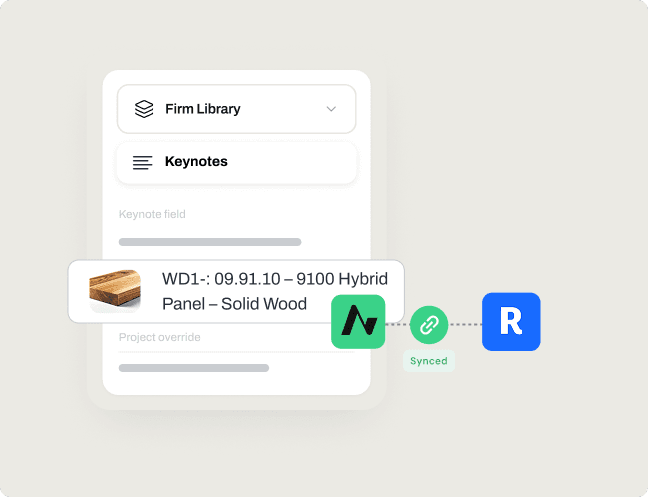
Keynotes Automation
Standardized keynote values sync bidirectionally with Revit.

Auto Syncing
Eliminates manual back-and-forth for keynote entry & cross-referencing.
Skip to Final Design

Or keep scrolling to know the design process
Context & Background
About Acelab Material Hub
Acelab’s Materials Hub is a construction industry platform that helps architects, contractors, and specifiers manage building materials and project schedules from early stage to specifications. It also connects architects with Manufacturers to get quotes and material specs for their projects.
The platform serves major user groups in the Architecture & Construction Industry (AEC):

Architects & Designers
Every material decision from first search for final specs of an architetcural project.

Owners & Developers
Coordinate project delivery with Material Intellegence and get real-time project insights.

Manufacturers & Suppliers
Engage with architects and owners when timing matters most.
Research reframe
But first, we needed to hear it what architects want?
We ran contextual inquiry sessions, 3 to 5 participants per session, recruited from firms with active Revit workflows and focus groups with architects and BIM managers across AECOM, JLL, HOK,
and Sasaki which are big firms, watching how they actually moved between tools during a project.
We expected to confirm what we already believed:
Architects want a faster way to push Acelab data into Revit.
But the response we got surprised us!
8/10
Said they never fully close Revit during an active project
9/10
Said Revit as their real source of truth not any web tool
10/10
Said they'd use a tool more if it lived inside Revit
Disjointed Context-Switching
Architects leave Revit to find materials
Jumping between browser tabs and the design environment breaks focus and slows down documentation.
Sync conflicts
Manual updates create version risk
A single mismatched parameter between a web collection and an active drawing can cascade into costly errors on site.
BREAKDOWN OF THE GAPS & PAIN POINTS IN THE WORKFLOW
One-way data flow
The desktop file is the only source of truth
No path from web to model means users who prefer cloud-first workflows are stuck.
Keynote Constraints
File-based updates don't scale
Manual keynote management breaks down during heavy documentation — model connections drop and data corrupts.
Hypothesis
We entered discovery with a hypothesis.
Architects want to push Acelab data into Revit faster.
What we found was different. The workflow wasn't linear — and it wasn't one direction.
BIM managers started from Revit. Architects started from Acelab. Neither was wrong. Both were primary. That single observation rewrote the brief.
Every request architects made pointed to something deeper than a missing feature. Here's what we heard — and what it actually meant.
Ranked #1 · All Firms
Real-time sync
Confidence in data integrity
Sync = trust, not speed
Ranked #2 · HMC & COOKFOX
Bulk keynote assignment
Reduce repetitive work
The real cost is human time
Top 3 · All Firms
Spec integration
One authoritative source
"Doing the work once"
Unprompted · Beth
Rendering software
Workflow continuity
Don't break their existing tools
Six findings. One rewritten brief, but we still hadn't answered. Where should Acelab actually live?


Each finding from the focus groups scored by user impact × design impact ÷ effort. Anything above 3.5 shipped in v1.
Exploring platform approaches
So before deciding what to build, we asked:
where should it live?
Coming out of the workflow audit and focus groups, the problem was clear — but the solution space wasn't. We had three technically viable paths to connect Acelab and Revit.
We mapped them out, stress-tested each one, and took the questions again into focus groups before committing to any direction to validate our research.
01
CSV Import
Still manual. Still one-directional. A half-measure that creates a new version-drift problem on every export. We'd already partially shipped this — architects already hated it.
02
Web API Bridge
Web API's weer
03
Plug-in
Firms where archietcts alreadu work, presitent and can live bidirectional and stargetic once embeded switich cost is high
Selected approach
This solution brought Acelab’s product intelligence to the heart of the design process, enabling faster decisions, consistent data, and better collaboration between architects and manufacturers.
The Design Solution
What the
plug in unlocked?

Before — The Broken Workflow
5×
manual steps. every project. no exception
Select product in Acelab, leave Revit to do it
Re-enter every field manually — manufacturer, model, specs
Product changes mid-project — update both tools by hand
Keynote .txt managed manually in MasterFormat
No single source of truth — version drift guaranteed
After — What the Plugin Unlocked
1×
sync. both tools. always aligned.
Search and select products from Acelab without leaving Revit
Link product data directly to Revit families and materials
Automatically sync specifications and metadata between both tools
Work collaboratively on cloud and workshared models with full Acelab access
Bidirectional by design — start from Acelab or Revit, both directions first-class
Exisiting State
It shipped. It worked.
And then it changed
how Acelab was positioned.
6+
Enterprise firms Adopted:
AECOM, JLL, HOK, Sasaki and more..
2
Mapping directions. Both first-class.
One modal.
$→
Became a premium paid feature. Direct revenue driver for Acelab.
The plugin launched Q3 2025 as a premium paid feature.
AECOM, JLL, HOK, and Sasaki adopted at launch. But the bigger shift wasn't the adoption numbers it was what the plugin meant for how Acelab described itself.

A new way to make your transit
in Boston digital & easy.
-Thankyou-