



Acelab's RFI
Designing a schedule-native data request loop
that connects architects and manufacturers.
0→1 Design & Strategy · Design System · Stakeholder Alignment


Seamlessly design and edit documents
RFI is an in-platform way for architects to request product data from manufacturers — structured around the schedule itself, so answers flow straight back into the fields they were requested for.
It replaces the email chains, ad-hoc spreadsheets, and manual copy-paste that architects use today, and gives manufacturers a real queue of asks to act on.
6+
Enterprise firms Adopted:
AECOM, JLL, HOK, Sasaki and more..
2
Mapping directions.
Both first-class.
One modal.
$→
Became a premium paid feature. Direct revenue driver for Acelab.

What I owned — and how I worked
PRODUCT
Request for Information (RFI) — a module of Acelab's Materials Hub
TIMELINE
Foundations Apr 2026 → Part 1 Jul 2026 → v2 targeting Aug 2026
MY ROLE
As the only designer on a surface this large, the job was as much about driving clarity across the team as it was about the pixels. I owned the design end-to-end and used the model and the flows to keep product and engineering aligned on one bar.
Ran discovery with both sides of the market, synthesized it into a journey map and jobs-to-be-done, and reframed a vague brief into a sharp design problem.
Defined the core objects, dual-track status model that every downstream surface is built on.
Designed the full hi-fi experience for both architect and manufacturer — flows, states, edge cases.
Created marketing brief, product launch plan and presented the design to Stakeholders pre-launch.
TEAM
Purti Hardikar - Lead Product Designer
Stephen Sandberg - Product Manager
Mayank Singh - CTO/ Eng Lead
Bereket Abera - FE Developer
Ben Kuhn - Eng Intern
SCOPE & SURFACE
5 parallel workstreams.
Schedules, Conversations, and two new RFI dashboards (architect + manufacturer)
IMPACT
We got more sutaomers, to our enterrise plan and archietcts useage considering RFI
THE 30 SECOND VERSION
The problem with paper and spreadsheets
While architects trust Acelab schedules as their source of truth, the vital step of populating them with manufacturer data was taking place outside the platform.
The old process was an administrative nightmare. Driven by emails, spreadsheets, and paper trails, requesting manufacturer data meant leaving Acelab—and critical answers rarely made it back to the schedule.
To solve this we gap
We created an end-to-end request loop that pulls manufacturer data straight into Acelab schedules. This feature directly targets the material specification and RFI bottleneck.

Here are some of the key worklows we designed for an RFI
I mapped every loan state that changes what someone sees: current, past due, hardship, paid ahead, paid off, and the edges in between. Each state got three screens. Home is the snapshot. Loan details is the summary. Extended view is the full breakdown. When the set was complete, I took it to PM, engineering,
and design.
I mapped every loan state that changes what someone sees: current, past due, hardship, paid ahead, paid off, and the edges in between. Each state got three screens. Home is the snapshot. Loan details is the summary. Extended view is the full breakdown. When the set was complete, I took it to PM, engineering,
and design.
DOMAIN CONTEXT
First, What is an RFI?
RFI (Request for Information) is the formal, written way a project team resolves something in the documents that is unclear, missing, or conflicting — a documented question and answer, with a clear owner and a deadline.
However, viewed through a Systems UX lens, an RFI is far more than a simple Q&A interaction
it is a critical indicator of upstream information failure, a primary source of cognitive strain, and a major financial and legal risk vector across the entire built environment lifecycle.

Why Are Construction RFIs Important?
In commercial construction, Requests for Information (RFIs) regarding material substitutions are one of the most high-risk, time-consuming bottlenecks for architectural teams. When a specified product is out of stock or delayed, contractors submit substitution RFIs.
Types of RFIs in Construction
RFIs can range from queries about material specifications to requests for clarification on design drawings or construction techniques. Some common types include:
1. Design Clarification RFIs
2.Construction Coordination RFIs
3.Material or Product Substitution RFIs (Acelab focus)
4.Utility Conflict RFIs
DEFINING THE BRIEF
We mapped how architects chase this data today
Before our solution, resolving a material or design Request for Information (RFI) during Construction Administration (CA) required an architect to manually stitch together context across 5 to 6 disconnected software silos.

On a typical commercial project, this traditional manual process takes an average of 11.4 calendar days per RFI and forces 18+ context switches per query.
THE PROBLEM
Biggest Challenges of the RFI Process
Historically, this meant sending flat 50-page PDF cut sheets across tools like Procore, forcing architects to manually compare technical specifications line-by-line across multiple spec books and BIM models.
This manual process leads to:
Severe Context Switching
Navigating 5–6 tools to answer a single material query. If an RFI is unclear then time is likely to be wasted when the recipient seeks clarification of the request, or if they respond in a way that doesn’t match the intent of the RFI
Delayed responses
Project timelines and activities can be disrupted by failures to answer construction RFIs in a timely manner.
Incomplete or inaccurate information
Even if an RFI is presented clearly, there may be times when the response that comes back is unclear, incomplete or inaccurate, and this can compound errors and cause delays.

LEARNING FROM DATA & USERS
Out of curiosity, I wanted to dig deeper into the existing data to figure out
what the missing piece was.
I started with what we already had in Mixpanel for the last 30 days. The funnel made the gap obvious: plenty of traffic and sign-ups, then almost nobody on the upgrade step. A separate view of feature usage showed the same story in a different shape. Search and the color editor got real use, while a long tail of features barely moved.
Users signed up in the last 30 days, but did not
upgrade to the premium plan.

Feature usage was low, suggesting users were
unable to discover it or did not find it helpful.


That still did not answer the 'why,' but it directed me towards the pain points.
Despite two decades of digital transformation and the widespread adoption of construction management platforms (such as Procore, Autodesk Construction Cloud, and Bluebeam Revu), architects consistently rank RFI processing as their most frustrating, unprofitable, and anxiety
Light users
Primary research
Power users
Secondary research


Users preferred to go mobile first on Online Servicing web
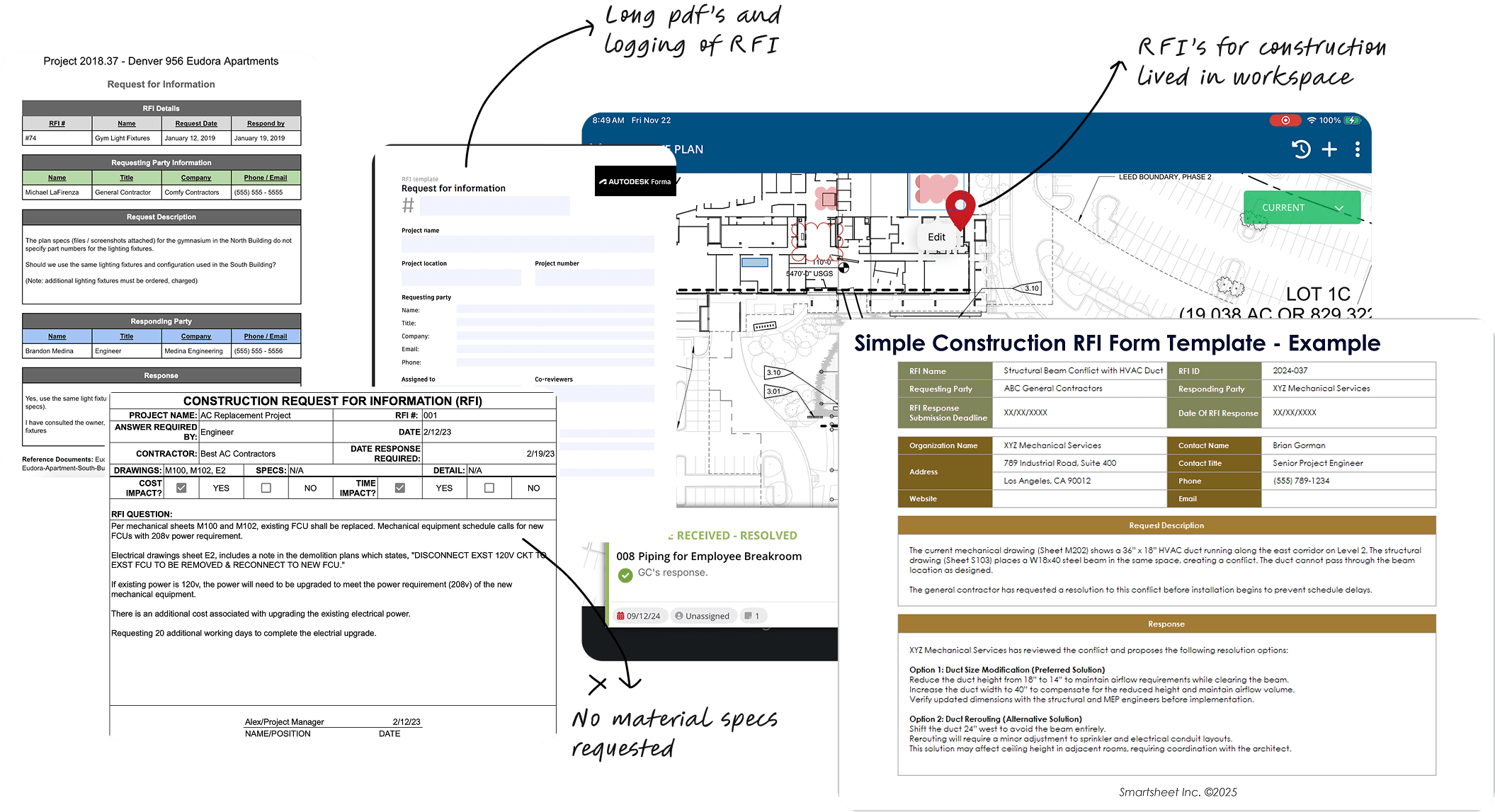

We analysed the various types of RFI tools, and how architetc;'s were sending RFI's in their current worklfows sepcially fort material selection
Much of the data architects need — pricing, lead times, compliance docs, custom specs — isn't published online, so they have to go ask the manufacturer for it. In discovery we kept seeing the same workaround: the request left the platform entirely — into email chains, shared spreadsheets, and manual copy-paste back into the schedule.
The moment the ask left the schedule, it stopped being connected to it.

How might we enable architects to request missing manufacturer data directly within the schedule, route it automatically to the right contact, and seamlessly populate the answers back into the cells?
To understand the entire flow, we had to decide where will RFI's live in Acelab
We build the feature strategy and the whole design to carter to the overview work flow of the connect between architect and the MFR.. Each one is really a well-worn UX principle in working clothes — which meant I could always explain why, not just what.
Start in Schedules
(Architect's workspace)
The request begins right inside the schedule architects use every day — no new place to learn, no context to lose.
Jakob's Law · familiarity
Never leave them guessing
(RFI's are always connected to Project)
Answers write back into the exact cells, the status is visible on both sides, and mistakes are caught before they happen — not reported after.
Visibility of status. Recognition over recall.
Let the system do the heavy lifting
(We do automatic batching)
One selection quietly becomes one clean request per manufacturer. The messy batching is the software's job — the architect just picks products.
Tesler's Law; Hick's Law




PLATFORM STATE
Building the connection: Acelab Schedules & RFI's
To see why this mattered, you have to see where architects live. Acelab's Materials Hub is where they research, compare, and specify building products — and at its core is Schedules, a live table of every specified product on a project, with fields, images, manufacturer data, and custom columns.

Hand Off
How does an architect request for an RFI?
We reduced the multi-facted painful workflow to a 5-step flow
We fixed the tedious workflow that architatct;s had to go through to request an RFI, by creating a 5 stepper requesting RFI modal. Once the user slectes products in scheduels, the architect then confims their product selection.


A video showing how an architect and send an RFI, with project details already backed in the RFI process since we are starting in schedules, RFI's always live in a project and are assosciated with a project,
Important decicions taken
Context & Background
Designing the rest of the loop and the messy middle
Part 1 validated the send path of architect's sending an RFI. Part 2 is where I designed the manufacturer experience, both dashboards, conversations, notifications, and the guardrails that make it safe on live schedules.

This allowed the users to select the products by fields.

Hand Off
How does the MFR recieve the request?
A dedicated projcet level =daqhabord for archietcts, over a liftime of a rpjetc an archietct would end up esni8dng multi8pple rfis, and them liubing in converstaions only would mean a lot of toruble in o0rder to find them at a glace, this dashbioard was a opart of the scope added t6o make sure RFI's have a plaqcxe.

Payroll efficiency
Automate and manage payroll processing with real-time updates.
Contract oversight
Track and oversee contract signings and revisions with ease.
Contract oversight
Track and oversee contract signings and revisions with ease.
Hand Off
Rfi's can't live only in conversations
We decided to have a dashboard for archietcts the RFI's lived within the project workspace,
A dedicated projcet level =daqhabord for archietcts, over a liftime of a rpjetc an archietct would end up esni8dng multi8pple rfis, and them liubing in converstaions only would mean a lot of toruble in o0rder to find them at a glace, this dashbioard was a opart of the scope added t6o make sure RFI's have a plaqcxe.

The early numbers showed that users were struggling to find format options because the options were
displayed under the dropdown, making them much harder to spot.